
Best 5001 to 10000 Routers in 2026: 15 Picks by Specs
The ASUS RT-BE9700 is our top pick in the 5001 to 10000 Mbps speed class. It is a tri-band Wi-Fi 7 router with a 9.7 Gbps combined rate, dual WAN ports, and mesh support, which makes it a strong foundation for a fast home network. The rest of this guide compares routers from the listing pool on their stated specifications, published coverage, and wireless features. Live prices appear on the page. No unit was tested, so the picks reflect what the sellers and makers state.
15 picks from 33 routers that match this guide with a price we can quote today, made by 29 makers. Each price below is read live and stamped with the time it was read.
The short list
Who each pick suits
- For a Wi-Fi 7 single router: If you want one powerful router with tri-band Wi-Fi 7 and room to add mesh nodes later, the ASUS RT-BE9700 is the pick. See pick 1
- For whole-home coverage: The TP-Link Deco 7 Pro three-pack covers up to 9,300 sq ft and is built around Wi-Fi 7 mesh. See pick 2
- For gaming with 6 GHz: The MSI Radix AXE6600 adds Wi-Fi 6E, AI QoS, and RGB in a tri-band gaming router. See pick 7
- For VPN and multi-gig: The GL.iNet GL-BE9300 pairs tri-band Wi-Fi 7 with multi-gig wired ports and a VPN-focused design. See pick 5
The 15 picks, one by one
1 Best overall

ASUS RT-BE9700 WiFi 7 Router
- Wi-Fi standard
- Wi-Fi 7
- Bands
- Tri-band
- Speed class
- 5001 to 10000
- Coverage
- 2,001 to 4,000 sq ft
- Mesh
- Yes
- Multi-gig port
- Yes
$249.99 (as of 10/26/2026 12:09 PDT - Details)
This is the strongest single-router pick in the speed class. Its tri-band Wi-Fi 7 layout uses the 6 GHz band, the combined rate is 9.7 Gbps, and the two WAN ports allow redundant or load-balanced internet connections. Mesh support means a single unit can be expanded later, unlike fixed one-piece designs.
Pros
- Tri-band Wi-Fi 7 with 6 GHz support
- 9.7 Gbps combined wireless rate
- Dual WAN ports
- Mesh support for later expansion
Cons
- Sold as a single router, not a mesh kit
- Coverage area not stated by the seller
Good fit if
- Buyers who want one high-performance Wi-Fi 7 router
- Households that may add mesh nodes later
Skip if
- You need whole-home mesh coverage out of the box
- You want a simpler dual-band router with fewer features
Verdict: The ASUS RT-BE9700 is the best balance of Wi-Fi 7 speed, dual WAN flexibility, and expandability in this guide.
2 Best mesh for very large homes

TP-Link Deco 7 Pro BE63 Tri-Band WiFi 7 BE10000 Whole Home Mesh System
- Wi-Fi standard
- Wi-Fi 7
- Bands
- Tri-band
- Speed class
- 5001 to 10000
- Coverage
- Over 6,000 sq ft
- Pack size
- 3 pack or more
- Mesh
- Yes
- Multi-gig port
- Yes
$626.49 (as of 10/26/2026 20:06 PDT - Details)
This three-pack offers the largest stated coverage in the guide at up to 9,300 sq ft. It is a tri-band Wi-Fi 7 mesh with a BE10000 system rate, and multi-gig wired support is listed. The kit is a better fit for whole-home coverage than any single router here.
Pros
- Tri-band Wi-Fi 7 mesh with BE10000 class speed
- Three-unit pack covers up to 9,300 sq ft
- Multi-gig wired support listed
- Whole-home mesh use case
Cons
- Three units take more space and setup time
- Individual unit speed split not stated by the seller
Good fit if
- Large homes with dead zones across multiple floors
- Buyers who want Wi-Fi 7 without managing a separate access point
Skip if
- Small apartments where one router is enough
- You need a single compact unit rather than a mesh kit
Verdict: For whole-home Wi-Fi 7 coverage, the Deco 7 Pro three-pack is the most complete mesh choice in this speed class.
3 Best Wi-Fi 6 mesh with satellites

NETGEAR Orbi Whole Home Tri-Band WiFi 6 Mesh Network System
- Wi-Fi standard
- Wi-Fi 6
- Bands
- Tri-band
- Speed class
- 5001 to 10000
- Coverage
- Over 6,000 sq ft
- Mesh
- Yes
$394.99 (as of 10/26/2026 17:11 PDT - Details)
This NETGEAR Orbi system pairs one router with three satellite extenders and states coverage over 6,000 sq ft. It is a tri-band Wi-Fi 6 mesh, which keeps compatibility wide for existing devices. The bundle is useful for large homes that do not need 6 GHz yet.
Pros
- Router plus three satellite extenders
- Over 6,000 sq ft coverage stated
- Tri-band Wi-Fi 6 for broad device compatibility
- Security features included with the system
Cons
- Wi-Fi 6 rather than Wi-Fi 6E or Wi-Fi 7
- Multi-gig wired ports not stated by the seller
Good fit if
- Large homes with existing Wi-Fi 6 devices
- Buyers who want four mesh units in one kit
Skip if
- You want a 6 GHz band for newer devices
- You prefer a single router over multiple nodes
Verdict: The Orbi RBK754P is the strongest Wi-Fi 6 mesh kit in this guide when you need multiple satellites.
4 Best mesh for many devices

Linksys MX8503 Atlas WiFi 6E Router Home WiFi Mesh System
- Wi-Fi standard
- Wi-Fi 6E
- Bands
- Tri-band
- Speed class
- 5001 to 10000
- Coverage
- Over 6,000 sq ft
- Pack size
- 3 pack or more
- Mesh
- Yes
- Gaming
- Yes
The Linksys Atlas system states a 9,000 sq ft coverage area and support for 195+ devices, the highest device count in this guide. It is a tri-band Wi-Fi 6E mesh with a gaming use case. That combination makes it a fit for dense households with many clients.
Pros
- Three-pack mesh covers 9,000 sq ft
- Supports 195+ devices as stated
- Tri-band Wi-Fi 6E with a 6 GHz band
- Gaming use case listed
Cons
- Larger mesh kit with more setup than a single router
- Port details are not stated by the seller
Good fit if
- Busy households with many phones, laptops, and smart home devices
- Homes that need wide Wi-Fi 6E coverage
Skip if
- You need fewer devices and a smaller footprint
- You want Wi-Fi 7 rather than Wi-Fi 6E
Verdict: The Linksys MX8503 stands out for very large homes that must support many simultaneous clients.
5 Best VPN router

GL.iNet GL-BE9300 Flint 3 Tri-Band Wi-Fi 7 Router 5 x 2.5G VPN Router
- Wi-Fi standard
- Wi-Fi 7
- Bands
- Tri-band
- Speed class
- 5001 to 10000
- Multi-gig port
- Yes
- Gaming
- Yes
$209.99 (as of 10/26/2026 14:10 PDT - Details)
The GL.iNet Flint 3 is the only pick in this guide whose product name puts VPN ahead of the wireless spec list. It combines tri-band Wi-Fi 7 with multi-gig wired support. Power users who route traffic through VPNs will value that focus.
Pros
- Tri-band Wi-Fi 7
- Multi-gig wired support listed
- VPN-focused router design
- BE9300 speed class
Cons
- Mesh support not stated by the seller
- Coverage area not stated by the seller
Good fit if
- Users who route some or all traffic through a VPN
- Buyers with multi-gig wired devices such as NAS units
Skip if
- You need a whole-home mesh system
- You only need basic dual-band wireless
Verdict: The GL.iNet GL-BE9300 is the best VPN-oriented router in this speed class among the picks.
6 Best gaming router with mesh support

ASUS TUF Gaming BE6500 WiFi 7 Router
- Wi-Fi standard
- Wi-Fi 7
- Bands
- Dual-band
- Speed class
- 5001 to 10000
- Mesh
- Yes
- Multi-gig port
- Yes
- Gaming
- Yes
$195.00 (as of 10/26/2026 12:09 PDT - Details)
The ASUS TUF Gaming BE6500 is the only pick that combines a gaming use case with mesh support in the pool. It is a dual-band Wi-Fi 7 router with Game Accelerator and Multi-Link Operation. Gamers who may later extend coverage with additional nodes get both features in one product.
Pros
- Wi-Fi 7 with gaming features
- Game Accelerator and Multi-Link Operation listed
- Mesh support for expansion
- 6.5 Gbps class wireless rate
Cons
- Dual-band layout omits a dedicated 6 GHz band
- Wired port details not stated by the seller
Good fit if
- Gamers who want a single router now and mesh later
- Buyers upgrading from Wi-Fi 6 routers
Skip if
- You need a tri-band router for very busy networks
- You prefer a non-gaming router with fewer visual cues
Verdict: For gaming plus mesh expansion, the ASUS TUF Gaming BE6500 is the most direct fit in this guide.
7 Best Wi-Fi 6E gaming router with AI QoS

MSI Radix AXE6600 WiFi 6E Tri-Band Gaming Router
- Wi-Fi standard
- Wi-Fi 6E
- Bands
- Tri-band
- Speed class
- 5001 to 10000
- Gaming
- Yes
$106.72 (as of 10/26/2026 17:09 PDT - Details)
The MSI Radix AXE6600 pairs tri-band Wi-Fi 6E with a 1.8 GHz quad-core processor and AI QoS. Among the gaming-focused picks, it is the one that lists a processor speed and QoS feature set. The RGB lighting also gives it a gaming-oriented look.
Pros
- Tri-band Wi-Fi 6E with 6 GHz support
- 1.8 GHz quad-core processor listed
- AI QoS for traffic prioritization
- RGB lighting
Cons
- Wi-Fi 6E rather than Wi-Fi 7
- Mesh support not stated by the seller
Good fit if
- Gamers who want 6 GHz bandwidth now
- Users who want processor and QoS details in the spec sheet
Skip if
- You need the latest Wi-Fi 7 feature set
- You need a mesh system instead of a single router
Verdict: The MSI Radix AXE6600 is the best Wi-Fi 6E gaming router in this guide for spec-conscious gamers.
8 Best dual-band Wi-Fi 7 gaming router
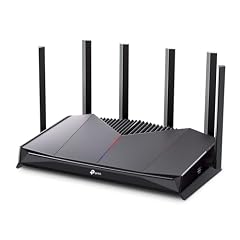
TP-Link Dual-Band BE6500 WiFi 7 Gaming Router 6.5 Gbps
- Wi-Fi standard
- Wi-Fi 7
- Bands
- Dual-band
- Speed class
- 5001 to 10000
- Multi-gig port
- Yes
- Gaming
- Yes
$194.99 (as of 10/26/2026 20:06 PDT - Details)
The Archer GE400 is the gaming version of TP-Link's BE6500-class Wi-Fi 7 platform and is the only listed product with both dual-band Wi-Fi 7 and gaming features. It keeps the 6.5 Gbps class rate in a dual-band design. This pick suits gamers who do not need a third band but want Wi-Fi 7.
Pros
- Wi-Fi 7 with a 6.5 Gbps class rate
- Dual-band layout for straightforward setup
- Gaming use case listed
- BE6500 platform for modern clients
Cons
- Dual-band means no separate 6 GHz band
- Mesh support not stated by the seller
Good fit if
- Gamers upgrading to Wi-Fi 7 on a simpler network
- Users who want a gaming router without tri-band complexity
Skip if
- You need a dedicated 6 GHz radio
- You require mesh coverage across a large home
Verdict: The Archer GE400 is the most direct dual-band Wi-Fi 7 gaming router among these picks.
9 Best tri-band Wi-Fi 6E gaming router

TP-Link Tri-Band AXE5400 Wi-Fi 6E Gaming Router 6-Stream
- Wi-Fi standard
- Wi-Fi 6E
- Bands
- Tri-band
- Speed class
- 5001 to 10000
- Multi-gig port
- Yes
- Gaming
- Yes
$121.60 (as of 10/26/2026 20:06 PDT - Details)
The Archer GXE75 is a 6-stream AXE5400 gaming router with a tri-band layout and a dedicated gaming label. It offers 6 GHz support without moving to Wi-Fi 7. This is a flexible middle option for gamers who want tri-band performance today.
Pros
- Tri-band Wi-Fi 6E with 6 GHz support
- 6-stream AXE5400 class speed
- Gaming use case listed
- Single-unit design easy to place
Cons
- Wi-Fi 6E rather than Wi-Fi 7
- Mesh support not stated by the seller
Good fit if
- Gamers who want tri-band without Wi-Fi 7 yet
- Buyers who prefer a single gaming router over a mesh
Skip if
- You are investing in Wi-Fi 7 clients
- You need whole-home mesh coverage
Verdict: The Archer GXE75 is a strong tri-band Wi-Fi 6E gaming router for single-unit setups.
10 Best Wi-Fi 7 gaming router with VPN

GL.iNet GL-BE6500 Flint 3e Wi-Fi 7 Router
- Wi-Fi standard
- Wi-Fi 7
- Speed class
- 5001 to 10000
- Gaming
- Yes
$179.99 (as of 10/26/2026 14:10 PDT - Details)
The GL.iNet GL-BE6500 carries both gaming and VPN use cases in the listing, and it runs on Wi-Fi 7 with a BE6500 class rate. Among the gaming picks, it is the one that pairs VPN functionality with the newest wireless generation. It is a single-unit alternative to the larger mesh systems on this page.
Pros
- Wi-Fi 7 with BE6500 class speed
- Gaming use case listed
- VPN router positioning in the product name
- Single unit for straightforward setup
Cons
- Band layout not stated by the seller
- Mesh support not stated by the seller
Good fit if
- Gamers who also use a VPN
- Buyers who want Wi-Fi 7 gaming features in one box
Skip if
- You need explicit tri-band or dual-band specs
- You want a mesh system instead of a single router
Verdict: The GL.iNet GL-BE6500 covers the uncommon combination of Wi-Fi 7 gaming and VPN use in one device.
11 Best tri-band Wi-Fi 7 router with wire ports

Cudy BE6500 5-Port Wi-Fi 7 Router
- Wi-Fi standard
- Wi-Fi 7
- Speed class
- 5001 to 10000
- Coverage
- Up to 2,000 sq ft
- Mesh
- Yes
$99.99 (as of 10/26/2026 13:08 PDT - Details) Typical price: $109.99, 9% off
The Cudy BE6500 is a tri-band Wi-Fi 7 router with four antennas and five Gigabit Ethernet ports listed in the product name. It is one of the more straightforward ways to add 6 GHz Wi-Fi 7 to a home without a mesh system. The wired port count makes it easy to connect multiple devices.
Pros
- Tri-band Wi-Fi 7 with 6 GHz support
- Four antennas listed
- Five Gigabit Ethernet ports listed
- BE6500 class wireless rate
Cons
- No mesh support stated by the seller
- No multi-gig wired ports listed
Good fit if
- Buyers adding Wi-Fi 7 to a single-router network
- Homes with several wired devices
Skip if
- You need a mesh system
- You want 2.5G or faster wired ports
Verdict: The Cudy BE6500 is a practical tri-band Wi-Fi 7 router for wired-heavy homes.
12 Best BE9300-class tri-band router

TP-Link Tri-Band BE9300 WiFi 7 Router
- Wi-Fi standard
- Wi-Fi 7
- Bands
- Tri-band
- Speed class
- 5001 to 10000
- Coverage
- Up to 2,000 sq ft
- Multi-gig port
- Yes
$238.99 (as of 10/26/2026 20:06 PDT - Details)
The Archer BE550 is a tri-band Wi-Fi 7 router in the BE9300 class, which puts it near the top of this speed tier. It offers the 6 GHz band without requiring a mesh kit. For homes that want a powerful single source of Wi-Fi, this is one of the strongest options in the guide.
Pros
- Tri-band Wi-Fi 7 with a BE9300 class rate
- 6 GHz support with a single router
- No satellite units to place
Cons
- Mesh support not stated by the seller
- Wired port speed not stated by the seller
Good fit if
- Homes that can cover their space with one router
- Buyers who want near-top Wi-Fi 7 speed without mesh
Skip if
- You have large dead zones across multiple rooms
- You need exact multi-gig port details
Verdict: The Archer BE550 is a top tri-band Wi-Fi 7 single router in the 5001 to 10000 Mbps class.
13 Best simple dual-band Wi-Fi 7 router

TP-Link BE6500 Dual-Band WiFi 7 Router
- Wi-Fi standard
- Wi-Fi 7
- Bands
- Dual-band
- Speed class
- 5001 to 10000
- Coverage
- 2,001 to 4,000 sq ft
- Multi-gig port
- Yes
$139.00 (as of 10/26/2026 20:06 PDT - Details)
The TP-Link BE400 brings Wi-Fi 7 into a dual-band design, which keeps the setup simple while still offering a BE6500 class wireless rate. It lacks the extra radio and gaming labels found on other picks. This is a clean option for homes that want Wi-Fi 7 without extra complexity.
Pros
- Dual-band Wi-Fi 7 with a BE6500 class rate
- Simple feature set for basic networks
- Single-unit router
- Modern Wi-Fi 7 client support
Cons
- No 6 GHz band
- Gaming and mesh features not listed
Good fit if
- Homes upgrading from older Wi-Fi routers
- Buyers who want a no-frills Wi-Fi 7 router
Skip if
- You need a 6 GHz band
- You need gaming or mesh features
Verdict: The BE400 is the simplest dual-band Wi-Fi 7 router in this guide.
14 Best Wi-Fi 6 dual-band router

TP-Link AX6000 Wi-Fi 6 Dual Band Router
- Wi-Fi standard
- Wi-Fi 6
- Bands
- Dual-band
- Speed class
- 5001 to 10000
- Multi-gig port
- Yes
$136.99 (as of 10/26/2026 20:06 PDT - Details)
The Archer AX80 is the only dual-band Wi-Fi 6 router in our final picks, with an AX6000 class rate. It offers strong compatibility with the large installed base of Wi-Fi 6 devices. For homes that do not need 6 GHz, this is a stable single-router choice.
Pros
- Dual-band Wi-Fi 6 with AX6000 class speed
- Wide device compatibility
- Single router without satellites
Cons
- No 6 GHz band
- Mesh support not stated by the seller
Good fit if
- Device ecosystems that are still mostly Wi-Fi 6
- Buyers who want a dependable dual-band single router
Skip if
- You need 6 GHz for new devices
- You want Wi-Fi 7 for future-proofing
Verdict: The Archer AX80 is the best Wi-Fi 6 dual-band router in this guide for device compatibility.
15 Best tri-band Wi-Fi 6E mesh with satellites

NETGEAR Nighthawk Tri-Band Whole Home Mesh WiFi 6E System
- Wi-Fi standard
- Wi-Fi 6E
- Bands
- Tri-band
- Speed class
- 5001 to 10000
- Coverage
- Over 6,000 sq ft
- Mesh
- Yes
$859.99 (as of 10/26/2026 17:10 PDT - Details)
The Nighthawk MK93S is a tri-band Wi-Fi 6E mesh system with a router and two satellite extenders, and it states coverage over 6,000 sq ft. The 5.7 Gbps class speed is lower than the Wi-Fi 7 models, but the three-piece kit is a balanced way to cover a large home with 6 GHz support.
Pros
- Router plus two satellite extenders
- Tri-band Wi-Fi 6E with 6 GHz support
- Over 6,000 sq ft coverage stated
- Whole-home mesh use case
Cons
- Wi-Fi 6E rather than Wi-Fi 7
- Wired port details not stated by the seller
Good fit if
- Large homes that want 6 GHz without moving to Wi-Fi 7
- Buyers who prefer a mesh kit over a single router
Skip if
- You need the latest Wi-Fi 7 generation
- You need only one router and no satellites
Verdict: The Nighthawk MK93S is a solid tri-band Wi-Fi 6E mesh system for homes that want 6 GHz coverage across a large area.
Comparison table
| # | Router | Wi-Fi standard | Bands | Speed class | Coverage | Pack size | Mesh |
|---|---|---|---|---|---|---|---|
| 1 | ASUS RT-BE9700 WiFi 7 Router | Wi-Fi 7 | Tri-band | 5001 to 10000 | 2,001 to 4,000 sq ft | not stated | Yes |
| 2 | TP-Link Deco 7 Pro BE63 Tri-Band WiFi 7 BE10000 Whole Home Mesh System | Wi-Fi 7 | Tri-band | 5001 to 10000 | Over 6,000 sq ft | 3 pack or more | Yes |
| 3 | NETGEAR Orbi Whole Home Tri-Band WiFi 6 Mesh Network System | Wi-Fi 6 | Tri-band | 5001 to 10000 | Over 6,000 sq ft | not stated | Yes |
| 4 | Linksys MX8503 Atlas WiFi 6E Router Home WiFi Mesh System | Wi-Fi 6E | Tri-band | 5001 to 10000 | Over 6,000 sq ft | 3 pack or more | Yes |
| 5 | GL.iNet GL-BE9300 Flint 3 Tri-Band Wi-Fi 7 Router 5 x 2.5G VPN Router | Wi-Fi 7 | Tri-band | 5001 to 10000 | not stated | not stated | not stated |
| 6 | ASUS TUF Gaming BE6500 WiFi 7 Router | Wi-Fi 7 | Dual-band | 5001 to 10000 | not stated | not stated | Yes |
| 7 | MSI Radix AXE6600 WiFi 6E Tri-Band Gaming Router | Wi-Fi 6E | Tri-band | 5001 to 10000 | not stated | not stated | not stated |
| 8 | TP-Link Dual-Band BE6500 WiFi 7 Gaming Router 6.5 Gbps | Wi-Fi 7 | Dual-band | 5001 to 10000 | not stated | not stated | not stated |
| 9 | TP-Link Tri-Band AXE5400 Wi-Fi 6E Gaming Router 6-Stream | Wi-Fi 6E | Tri-band | 5001 to 10000 | not stated | not stated | not stated |
| 10 | GL.iNet GL-BE6500 Flint 3e Wi-Fi 7 Router | Wi-Fi 7 | not stated | 5001 to 10000 | not stated | not stated | not stated |
| 11 | Cudy BE6500 5-Port Wi-Fi 7 Router | Wi-Fi 7 | not stated | 5001 to 10000 | Up to 2,000 sq ft | not stated | Yes |
| 12 | TP-Link Tri-Band BE9300 WiFi 7 Router | Wi-Fi 7 | Tri-band | 5001 to 10000 | Up to 2,000 sq ft | not stated | not stated |
| 13 | TP-Link BE6500 Dual-Band WiFi 7 Router | Wi-Fi 7 | Dual-band | 5001 to 10000 | 2,001 to 4,000 sq ft | not stated | not stated |
| 14 | TP-Link AX6000 Wi-Fi 6 Dual Band Router | Wi-Fi 6 | Dual-band | 5001 to 10000 | not stated | not stated | not stated |
| 15 | NETGEAR Nighthawk Tri-Band Whole Home Mesh WiFi 6E System | Wi-Fi 6E | Tri-band | 5001 to 10000 | Over 6,000 sq ft | not stated | Yes |
How this list was made
The pool contained 23 routers with seller-stated speeds in the 5001 to 10000 Mbps class. We shortlisted models from established networking brands, kept new-condition units, and removed near-duplicate listings for the same model and pack size. Each pick was judged on stated specifications: Wi-Fi generation, band layout, mesh support, coverage figures, port features, and use-case labels such as gaming or VPN. Live prices were read from the store listing when the pool was created and are printed next to each product. No unit was tested in a lab or at home. Selections are based on the published information in the pool, supported by Wi-Fi Alliance and IEEE standard pages in the sources.
Choosing the right one
What the 5001 to 10000 Mbps class means
The 5001 to 10000 Mbps class is a combined wireless bandwidth figure, not a guarantee that any single device will reach that number. Router makers add the maximum data rates from each radio band to arrive at the total. A tri-band router with a 9.7 Gbps combined rate can still serve a single laptop at a much lower speed.
What the figure tells you is that the router is designed for high-throughput networks, often with Wi-Fi 6E or Wi-Fi 7 features. If your internet plan is slower than the router figure, the router will not make the connection faster than your provider delivers. The benefit is headroom for many devices, large file transfers, and future speed upgrades.
Wi-Fi 7, Wi-Fi 6E, and Wi-Fi 6
Wi-Fi 7 uses the 2.4 GHz, 5 GHz, and 6 GHz bands and includes features such as 320 MHz channels in the 6 GHz band, multi-link operation, and 4K QAM. Wi-Fi 6E added the 6 GHz band to Wi-Fi 6's feature set, while Wi-Fi 6 uses only 2.4 GHz and 5 GHz. The Wi-Fi Alliance describes these generations in its MAC/PHY technology pages.
In this speed class, most of the picks are Wi-Fi 7 or Wi-Fi 6E. The main practical difference is device support: a Wi-Fi 7 router can use its fastest modes only with Wi-Fi 7 clients. Older phones, laptops, and smart-home devices will still connect, but they will use their own earlier Wi-Fi generation.
Single router vs mesh system
A single router is easier to place and often less expensive. It is a good fit for apartments and smaller homes where one unit can cover the main living areas. Mesh systems use two or more nodes that share the same network name and hand off devices as they move around.
Mesh picks in this guide include the TP-Link Deco 7 Pro three-pack, the NETGEAR Orbi RBK754P with three satellites, and the Linksys MX8503. If a single router cannot reach the far side of the house, a mesh kit is the more practical choice. Some single-router picks, such as the ASUS RT-BE9700, list mesh support, meaning you can add compatible nodes later.
Gaming features and QoS
Gaming routers often include features such as Quality of Service, game accelerators, and wired Ethernet ports for consoles. QoS gives certain traffic priority, which can help keep game data moving when other devices are streaming video. A dedicated 6 GHz band on tri-band routers can also reduce congestion for gaming clients that support it.
The MSI Radix AXE6600 lists a 1.8 GHz quad-core processor and AI QoS. The ASUS TUF Gaming BE6500 lists Game Accelerator and Multi-Link Operation. If you mainly need a reliable connection for online play, any tri-band router in this guide can work. The gaming-specific picks add prioritization controls and visual styling, but they do not replace a good internet connection.
Security and WPA3
WPA3 is the current Wi-Fi security protocol and is mandatory for Wi-Fi CERTIFIED devices, according to the Wi-Fi Alliance. It improves protection against password-guessing attacks and requires Protected Management Frames. When you set up a new router, choose WPA3 if all your devices support it, or use the mixed WPA2/WPA3 mode offered by many routers.
Router security also includes firmware updates and built-in protection features. Several picks in this guide include security as part of the product description. The NIST cybersecurity pages are a good starting point for broader advice on securing home networks, including changing default passwords and keeping firmware current.
Ports and multi-gig wired networking
Wired ports matter for game consoles, desktop computers, network-attached storage, and mesh backhaul links. In this speed class, the port speeds vary widely. The GL.iNet GL-BE9300 lists multi-gig wired support, and the TP-Link Deco 7 Pro three-pack also lists multi-gig wired capability. The Cudy BE6500 lists five Gigabit Ethernet ports.
If your internet plan is faster than 1 Gbps, look for a router with at least one multi-gig WAN port so the wired connection does not become the bottleneck. For most households, Gigabit Ethernet is still enough for streaming, gaming, and everyday work. The port details on some pool entries are not stated by the seller, so check the product page before buying if wired speed is critical.
Questions
Does a 5001 to 10000 Mbps router make every device faster?
No. The 5001 to 10000 Mbps figure is the combined wireless bandwidth across all bands. A single device will usually connect at a lower speed based on its Wi-Fi generation, antenna count, and distance from the router. A fast router helps when many devices are active at once, large files are moving on the network, or your internet plan is multigigabit. It does not increase the speed your internet provider sends to your home.
Do I need Wi-Fi 7 for this speed class?
Not necessarily. The pool contains Wi-Fi 7, Wi-Fi 6E, Wi-Fi 6, and even one Wi-Fi 5 mesh system within the 5001 to 10000 Mbps class. Wi-Fi 7 is the newest generation and offers features like 320 MHz channels in the 6 GHz band and multi-link operation. Wi-Fi 6E also uses 6 GHz and is a good choice if your devices do not support Wi-Fi 7 yet. Choose Wi-Fi 7 if you want the longest useful life from the router.
What is a mesh system and when should I choose one?
A mesh system uses multiple nodes that work together to broadcast one Wi-Fi network. The nodes communicate with each other, so devices can move through a large home without manually switching networks. Choose a mesh system when a single router cannot cover all rooms, when you have thick walls or multiple floors, or when you want one network name throughout the house. A three-pack like the TP-Link Deco 7 Pro or NETGEAR Orbi can cover more than 6,000 sq ft.
Can I use a gaming router for normal home use?
Yes. A gaming router is still a regular router, and it will work with phones, laptops, streaming devices, and smart-home products. Gaming-specific features such as QoS, game accelerators, and RGB lighting do not stop normal traffic from flowing. The main trade-offs are usually visual design, extra software options, and sometimes a more complex user interface. If you also want mesh support, the ASUS TUF Gaming BE6500 combines gaming features with a mesh-capable design.
What is WPA3 and why does it matter?
WPA3 is the latest Wi-Fi security protocol. According to the Wi-Fi Alliance, it is mandatory for Wi-Fi CERTIFIED devices and provides stronger authentication than older WPA2 networks. It also requires Protected Management Frames, which help protect against some eavesdropping and forgery attacks. When you set up a new router, use WPA3 if all your devices support it. Many routers also offer a mixed mode so older devices can still connect while newer devices use WPA3.
What changed
- : First published.