
Best Up to 2,000 Sq Ft Routers in 2026: 10 Picks Compared on Specs
The eero Pro 7 is the first router compared here for a home up to 2,000 sq ft: it combines tri-band Wi-Fi 7, mesh support, and a listed coverage specification of up to 2,000 sq ft in a single unit. This guide covers 10 routers that carry the same coverage class, from a Wi-Fi 7 standalone unit to dual-band mesh systems. Each pick was chosen using the stated specifications in the catalog: coverage, Wi-Fi generation, band support, mesh capability, and internet plan support. Live prices appear on the page, and no unit was tested.
10 picks from 22 routers that match this guide with a price we can quote today, made by 29 makers. Each price below is read live and stamped with the time it was read.
The short list
Who each pick suits
- For one Wi-Fi 7 router, not a mesh kit: You want the current Wi-Fi generation in a single unit and may add mesh nodes later. See pick 2
- For gaming on a standalone router: You need dual-band Wi-Fi 6 with gaming-oriented features and do not need mesh expansion. See pick 4
- For a mesh system with many devices: You want mesh support and the highest stated device count in this list. See pick 5
- For tri-band Wi-Fi 7 mesh: You want the top overall specs: tri-band Wi-Fi 7, mesh support, and support for faster internet plans. See pick 1
The 10 picks, one by one
1 Best overall

Amazon eero Pro 7 tri-band mesh Wi-Fi 7 router
- Wi-Fi standard
- Wi-Fi 7
- Bands
- Tri-band
- Coverage
- Up to 2,000 sq ft
- Pack size
- 1 pack
- Mesh
- Yes
- Multi-gig port
- Yes
$299.99 (as of 10/26/2026 22:46 PDT - Details)
This single pack includes tri-band Wi-Fi 7, mesh support, and a coverage specification of up to 2,000 sq ft. It also states support for internet plans up to 5 Gbps, the highest internet plan figure among the picks here. If you want the current Wi-Fi generation in a mesh-ready package, this is the strongest starting point.
Pros
- Tri-band Wi-Fi 7 with coverage listed up to 2,000 sq ft
- Stated support for internet plans up to 5 Gbps, the highest in this list
- Mesh support with one pack included
Cons
- Ethernet port count is not stated by the seller
- Band details beyond tri-band are not specified in the catalog
- One unit may not be enough for layouts with many walls, though the listed coverage is 2,000 sq ft
Good fit if
- Homes up to 2,000 sq ft that want Wi-Fi 7 now
- People who plan to add mesh nodes later
Skip if
- Wired-backhaul or exact Ethernet port counts matter
- You need a full mesh system with multiple units included in one purchase
Verdict: The eero Pro 7 is the most future-proof single router here for a roughly 2,000 sq ft space.
2 Best single-unit Wi-Fi 7

ASUS RT-BE55 WiFi 7 Router
- Wi-Fi standard
- Wi-Fi 7
- Coverage
- Up to 2,000 sq ft
- Mesh
- Yes
- Multi-gig port
- Yes
$119.99 (as of 10/26/2026 12:09 PDT - Details)
The ASUS RT-BE55 is a single Wi-Fi 7 router with 3.6 Gbps speed stated in the product name. It includes mesh support and VPN support, so it works alone or can be used with mesh networking later. The catalog gives it the same up to 2,000 sq ft coverage tag as the top pick.
Pros
- Wi-Fi 7 with stated 3.6 Gbps speed
- Mesh support and VPN support stated in the product name
- Coverage listed up to 2,000 sq ft
Cons
- Band count is not stated by the seller
- Pack contents are not stated by the seller
- No stated internet plan maximum
Good fit if
- Single-router buyers who want Wi-Fi 7
- Users who need VPN features in the router
Skip if
- You need a mesh system with multiple nodes out of the box
- You need explicit tri-band or dual-band specifications
Verdict: The RT-BE55 brings Wi-Fi 7, mesh support, and VPN support into one standalone unit.
3 Best dual-band Wi-Fi 7 mesh

Amazon eero 7 dual-band mesh Wi-Fi 7 router
- Wi-Fi standard
- Wi-Fi 7
- Bands
- Dual-band
- Coverage
- Up to 2,000 sq ft
- Pack size
- 1 pack
- Mesh
- Yes
- Multi-gig port
- Yes
$169.99 (as of 10/26/2026 22:46 PDT - Details)
This eero 7 is a dual-band Wi-Fi 7 mesh router with a stated internet plan ceiling of 2.5 Gbps. It comes as a one-pack and shares the up to 2,000 sq ft coverage tag in this catalog. It provides Wi-Fi 7 without the separate backhaul band that tri-band models use.
Pros
- Dual-band Wi-Fi 7 with mesh support and one pack
- Stated support for internet plans up to 2.5 Gbps
- Coverage listed up to 2,000 sq ft
Cons
- No tri-band option; the catalog lists only dual-band
- Ethernet port count is not stated by the seller
- No stated device count
Good fit if
- Households with 2.5 Gbps or lower internet plans
- Users who want Wi-Fi 7 mesh without a tri-band backhaul
Skip if
- You want the faster tri-band Wi-Fi 7 model
- You need a stated maximum connected device count
Verdict: The eero 7 dual-band is a solid Wi-Fi 7 mesh pick for a 2,000 sq ft space.
4 Best for gaming

NETGEAR Nighthawk WiFi 6 Router
- Wi-Fi standard
- Wi-Fi 6
- Bands
- Dual-band
- Speed class
- 2001 to 5000
- Coverage
- Up to 2,000 sq ft
- Gaming
- Yes
The RAX36 is a dual-band Wi-Fi 6 router with the product name marking it as AX3000, or 3 Gbps wireless speed. The catalog flags it for gaming use, and its 2001 to 5000 Mbps speed category is among the faster standalone routers here. It does not include mesh support, so it is best as a single high-performance router.
Pros
- Dual-band Wi-Fi 6 with AX3000 (3 Gbps) speed stated
- Gaming use case is marked in the catalog
- Coverage listed up to 2,000 sq ft
Cons
- No mesh support listed
- Ethernet port count is not stated by the seller
- No stated internet plan maximum
Good fit if
- Gamers who want a single dual-band Wi-Fi 6 router
- Users who prefer a traditional standalone router
Skip if
- You need mesh coverage across a long, narrow floor plan
- You want Wi-Fi 7 or tri-band spectrum
Verdict: The RAX36 is the strongest gaming-focused standalone router in this list based on its stated specs.
5 Best for high device counts

Amazon eero 6 mesh wifi router
- Wi-Fi standard
- Wi-Fi 6
- Coverage
- Up to 2,000 sq ft
- Pack size
- 1 pack
- Mesh
- Yes
$89.99 (as of 10/26/2026 22:46 PDT - Details)
The eero 6 mesh router is listed with support for 75+ devices, the largest stated device count in this pool. It supports internet plans up to 900 Mbps and comes as a one-pack mesh unit. The catalog places it in the up to 2,000 sq ft coverage class, even though the product name lists 1,500 sq ft.
Pros
- Stated support for 75+ connected devices, the highest in this list
- Mesh support with one pack included
- Stated support for internet plans up to 900 Mbps
Cons
- Wi-Fi generation is not stated by the seller
- Band count is not stated by the seller
- Product name lists 1,500 sq ft, while the listing carries an up to 2,000 sq ft tag
Good fit if
- Homes with many smart home or mobile devices
- Users with internet plans up to 900 Mbps
Skip if
- You want a stated Wi-Fi 6 or Wi-Fi 7 generation
- You need support for faster multi-gig internet plans
Verdict: The eero 6 is the best choice here when the number of connected devices matters more than peak speed.
6 Best dual-band mesh Wi-Fi 6 router

Linksys AX2200 | Dual-Band Mesh WiFi 6 Router | 2.2
- Wi-Fi standard
- Wi-Fi 6
- Bands
- Dual-band
- Speed class
- 2001 to 5000
- Coverage
- Up to 2,000 sq ft
- Mesh
- Yes
$39.96 (as of 10/26/2026 16:09 PDT - Details)
This Linksys router combines dual-band Wi-Fi 6, mesh support, and a 2.2 Gbps AX2200 speed class. The catalog places it in the 2001 to 5000 Mbps speed range and the up to 2,000 sq ft coverage class. It is a direct dual-band mesh alternative to the Wi-Fi 7 eero model.
Pros
- Dual-band Wi-Fi 6 with mesh support
- AX2200 speed class with 2.2 Gbps stated in the product name
- Stated support for 15+ devices
- Coverage class listed up to 2,000 sq ft
Cons
- No stated internet plan maximum
- Bundle contents are not stated by the seller
- Product name lists 1,500 sq ft, while the listing carries an up to 2,000 sq ft tag
Good fit if
- Homes that want dual-band Wi-Fi 6 mesh
- Users with 15 to 20 connected devices
Skip if
- You need Wi-Fi 7
- You need a tri-band router with a dedicated backhaul band
Verdict: The Linksys AX2200 is a capable dual-band Wi-Fi 6 mesh router for moderate device loads.
7 Best dual-band mesh for smart home features
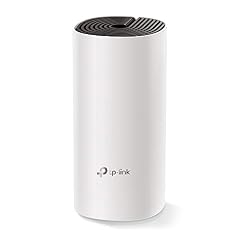
TP-Link Deco Whole Home Mesh WiFi Router
- Bands
- Dual-band
- Speed class
- Up to 2000
- Coverage
- Up to 2,000 sq ft
- Pack size
- 1 pack
- Mesh
- Yes
$47.99 (as of 10/26/2026 20:06 PDT - Details)
The TP-Link Deco is a dual-band mesh router with one pack included and an up to 2,000 sq ft coverage tag in the catalog. The product name calls out beamforming, MU-MIMO, and IPv6 support, which are useful for mixed-device homes. It does not state a Wi-Fi generation, so compare that against your client devices.
Pros
- Dual-band mesh support with one pack included
- Stated beamforming, MU-MIMO, and IPv6 support
- Coverage listed up to 2,000 sq ft
Cons
- Wi-Fi generation is not stated by the seller
- Speed class is not stated by the seller
- No stated internet plan maximum
Good fit if
- Homes with a mix of older and newer Wi-Fi clients
- Users who want mesh support and smart home features
Skip if
- You need a stated Wi-Fi 6 or Wi-Fi 7 specification
- You need a stated peak speed for planning multigig internet
Verdict: The Deco is a solid dual-band mesh option when smart home features matter and Wi-Fi generation is not a priority.
8 Best AC1200 mesh system

Google Wifi - AC1200
- Wi-Fi standard
- Wi-Fi 5
- Speed class
- Up to 2000
- Coverage
- Up to 2,000 sq ft
- Pack size
- 1 pack
- Mesh
- Yes
$58.99 (as of 10/26/2026 15:05 PDT - Details)
Google Wifi is a Wi-Fi 5 mesh router with an AC1200 speed class and one pack included. The catalog lists a speed category of up to 2000 and an up to 2,000 sq ft coverage tag. It is the only Wi-Fi 5 mesh system here besides the Linksys Wi-Fi 5 standalone router.
Pros
- Mesh support with one pack included
- Wi-Fi 5 AC1200 speed class
- Coverage listed up to 2,000 sq ft
Cons
- Band count is not stated by the seller
- Older Wi-Fi 5 standard, slower than Wi-Fi 6 or Wi-Fi 7 picks
- No stated device count
Good fit if
- Users replacing an older router with a simple mesh unit
- Homes with mostly older devices that do not support Wi-Fi 6
Skip if
- You need a current Wi-Fi generation
- You need a stated dual-band or tri-band specification
Verdict: Google Wifi is a straightforward AC1200 mesh choice for a 2,000 sq ft space.
9 Best standalone Wi-Fi 6 router

NETGEAR Nighthawk WiFi 6 Router R6700AX
- Wi-Fi standard
- Wi-Fi 6
- Bands
- Dual-band
- Speed class
- Up to 2000
- Coverage
- Up to 2,000 sq ft
$49.98 (as of 10/26/2026 17:10 PDT - Details) Typical price: $60.05, 17% off
The R6700AX is a Wi-Fi 6 standalone router with 1.8 Gbps speed stated in the product name and coverage listed up to 2,000 sq ft. It has no mesh support in the catalog entry, making it a direct alternative to the mesh systems here. It is a fit for homes that want a single router without adding nodes.
Pros
- Wi-Fi 6 with stated 1.8 Gbps speed
- Coverage listed up to 2,000 sq ft
- Standalone design with no mesh requirement
Cons
- Band count is not stated by the seller
- No mesh support listed
- No stated internet plan maximum
Good fit if
- Users who want a single Wi-Fi 6 router for an open floor plan
- Homes that do not need mesh nodes
Skip if
- You need mesh expansion later
- You need a stated dual-band or tri-band configuration
Verdict: The R6700AX is a straightforward single-unit Wi-Fi 6 router for up to 2,000 sq ft.
10 Best Wi-Fi 5 router for legacy networks

Linksys WiFi 5 Router | 1
- Wi-Fi standard
- Wi-Fi 5
- Speed class
- Up to 2000
- Coverage
- Up to 2,000 sq ft
$44.98 (as of 10/26/2026 16:09 PDT - Details)
This Linksys router is a Wi-Fi 5 standalone with AC1200 speed and a stated 20+ device capacity. The catalog places it in the up to 2,000 sq ft coverage class. It is the most basic pick here, useful for spaces where only older Wi-Fi 5 clients are present.
Pros
- Wi-Fi 5 AC1200 speed stated
- Stated support for 20+ devices
- Coverage listed up to 2,000 sq ft
Cons
- Band count is not stated by the seller
- No mesh support listed
- Older Wi-Fi 5 standard, slower than Wi-Fi 6 or Wi-Fi 7 picks
Good fit if
- Simple setups with older laptops and phones
- Temporary or guest networking where peak speed is not critical
Skip if
- You need Wi-Fi 6 or Wi-Fi 7
- You need mesh support or multi-gig throughput
Verdict: The Linksys Wi-Fi 5 router is a basic option for covering up to 2,000 sq ft with older devices.
Comparison table
| # | Router | Wi-Fi standard | Bands | Speed class | Coverage | Pack size | Mesh |
|---|---|---|---|---|---|---|---|
| 1 | Amazon eero Pro 7 tri-band mesh Wi-Fi 7 router | Wi-Fi 7 | Tri-band | not stated | Up to 2,000 sq ft | 1 pack | Yes |
| 2 | ASUS RT-BE55 WiFi 7 Router | Wi-Fi 7 | not stated | not stated | Up to 2,000 sq ft | not stated | Yes |
| 3 | Amazon eero 7 dual-band mesh Wi-Fi 7 router | Wi-Fi 7 | Dual-band | not stated | Up to 2,000 sq ft | 1 pack | Yes |
| 4 | NETGEAR Nighthawk WiFi 6 Router | Wi-Fi 6 | Dual-band | 2001 to 5000 | Up to 2,000 sq ft | not stated | not stated |
| 5 | Amazon eero 6 mesh wifi router | Wi-Fi 6 | not stated | not stated | Up to 2,000 sq ft | 1 pack | Yes |
| 6 | Linksys AX2200 | Dual-Band Mesh WiFi 6 Router | 2.2 | Wi-Fi 6 | Dual-band | 2001 to 5000 | Up to 2,000 sq ft | not stated | Yes |
| 7 | TP-Link Deco Whole Home Mesh WiFi Router | not stated | Dual-band | Up to 2000 | Up to 2,000 sq ft | 1 pack | Yes |
| 8 | Google Wifi - AC1200 | Wi-Fi 5 | not stated | Up to 2000 | Up to 2,000 sq ft | 1 pack | Yes |
| 9 | NETGEAR Nighthawk WiFi 6 Router R6700AX | Wi-Fi 6 | Dual-band | Up to 2000 | Up to 2,000 sq ft | not stated | not stated |
| 10 | Linksys WiFi 5 Router | 1 | Wi-Fi 5 | not stated | Up to 2000 | Up to 2,000 sq ft | not stated | not stated |
How this list was made
We started with 13 priced listings that matched the up to 2,000 sq ft coverage filter, then folded near-duplicate configurations down to 10 routers. Each unit is new and comes from an established maker. We shortlisted by reading the stated specifications: coverage, Wi-Fi generation, band count, mesh support, and internet plan cap. Live prices are printed on the page and were read at the time of writing. No unit was tested, and no customer reviews were consulted for this guide; the account below is based on the catalog specifications and the maker's published product details.
Choosing the right one
What the 2,000 sq ft coverage figure does and does not mean
Manufacturers state coverage in square feet, but the real range depends on walls, floors, and interference. A router listed for up to 2,000 sq ft may cover an open floor plan more easily than a multi-room layout with masonry walls. Use the listed figure as a planning number, not a guarantee.
Wi-Fi 5, Wi-Fi 6, and Wi-Fi 7
Wi-Fi 5 introduced dual-band operation in most products and higher capacity for applications such as 4K video. Wi-Fi 6 added OFDMA, multi-user MIMO, and 160 MHz channel support to improve dense environments. Wi-Fi 7, introduced in 2024, adds 320 MHz channels in the 6 GHz band, multi-link operation, and 4K QAM, according to the Wi-Fi Alliance. Pick the newest generation your devices support, but remember older Wi-Fi 5 devices will still connect to a Wi-Fi 6 or Wi-Fi 7 router.
Mesh systems vs standalone routers
Several picks, including the eero models and TP-Link Deco, are mesh routers. Mesh systems let you add additional units to extend coverage later. Standalone routers like the NETGEAR R6700AX cover their listed space from one unit. For a 2,000 sq ft home, either can work; a mesh system gives more flexibility if you want to expand into another room or floor.
Dual-band vs tri-band
Tri-band routers add a third radio, which can be dedicated to backhaul or high-demand clients. The eero Pro 7 is the only tri-band model among the 10 picks here. Several other picks are dual-band. Dual-band routers are simpler and often enough when your internet plan and client devices do not need a separate backhaul band.
Security and WPA3
Wi-Fi CERTIFIED devices use WPA3, which strengthens password protection and requires Protected Management Frames, according to the Wi-Fi Alliance. When you set up a router, enable the highest WPA mode your clients support. Government resources such as the NIST Small Business Cybersecurity Corner also gather guidance on basic protections for home and small office networks.
Matching the router to your internet plan
Some entries state a maximum internet plan speed, such as 900 Mbps, 2.5 Gbps, or 5 Gbps. If your plan is faster than the router's stated ceiling, the router may limit your wired or wireless throughput. If the catalog does not state a plan maximum, check the maker's product page before buying.
Questions
Can one router cover 2,000 sq ft?
Yes. Several routers in this list state coverage up to 2,000 sq ft from a single unit. The real range depends on wall materials, interference, and where you place the router. If your home is long or has thick walls, a mesh system with extra nodes may provide more consistent coverage, but the listed figure means the maker states the unit is suitable for that size.
Should I buy a tri-band router for a 2,000 sq ft home?
Tri-band routers add a third radio that can be used for backhaul or high-demand traffic. This helps in busy homes and mesh setups. Dual-band routers can be enough when your clients and internet plan are modest. Among the picks, the eero Pro 7 is tri-band and the eero 7 and Linksys AX2200 are dual-band.
What is the difference between Wi-Fi 5, Wi-Fi 6, and Wi-Fi 7?
Wi-Fi 5 brought dual-band operation and higher capacity for 4K video. Wi-Fi 6 added OFDMA, multi-user MIMO, and 160 MHz channel support for dense environments. Wi-Fi 7 adds 320 MHz channels in the 6 GHz band, multi-link operation, and 4K QAM. Your devices need to support a Wi-Fi generation to use its fastest features, so check your laptop, phone, and smart home hardware.
Do I need Wi-Fi 7 if I currently have Wi-Fi 6 clients?
No. Wi-Fi 7 routers are backward compatible and can serve Wi-Fi 6 and Wi-Fi 5 clients, but those clients will not get the full Wi-Fi 7 speed. If you plan to keep older devices for several years, Wi-Fi 6 is a reasonable choice. If you are buying new laptops or phones, Wi-Fi 7 is the more future-ready option.
How do I secure a router for up to 2,000 sq ft?
Start by changing the default admin password, enabling WPA3 or the strongest WPA mode available, and updating firmware. The Wi-Fi Alliance says WPA3 is mandatory for Wi-Fi CERTIFIED devices and requires Protected Management Frames. NIST's small business resources also recommend routine security practices such as strong passwords and regular updates. These steps apply regardless of whether you choose a mesh or standalone router.
Can I use a mesh router with just one unit?
Yes. Mesh routers can be used as a single unit, and you can add more nodes later. Several picks, including the eero Pro 7, eero 7, ASUS RT-BE55, and TP-Link Deco, come as one-pack mesh systems. Start with one unit and expand if a room still has weak coverage.
What changed
- : First published.