
Best TP-Link Routers in 2026: 15 Picks Compared on Specs
The Archer BE550 is the primary pick in this guide: a tri-band Wi-Fi 7 router with a listed speed of 5001 to 10000 in a standalone design. This guide lists 15 TP-Link routers and mesh systems from the catalogue, selected by Wi-Fi generation, bands, speed class, and form factor. Prices are live on the page. No member of the site has tested these units, so the choices rest on the specifications in the listings.
13 picks from 70 routers that match this guide with a price we can quote today, made by 29 makers. Each price below is read live and stamped with the time it was read.
The short list
Who each pick suits
- For a single router upgrade: If your current router is Wi-Fi 5, a Wi-Fi 7 model such as the Archer BE550 gives you the newest features without adding extra nodes. See pick 1
- For gaming on Wi-Fi: Choose a router TP-Link lists as gaming, such as the Archer GE800, to get a tri-band Wi-Fi 7 layout with an Over 10000 speed class. See pick 4
- For travel and rented spaces: A portable TP-Link travel router can turn one Ethernet or USB connection into a private network you control. See pick 10
The 13 picks, one by one
1 Best overall

TP-Link Tri-Band BE9300 WiFi 7 Router
- Wi-Fi standard
- Wi-Fi 7
- Bands
- Tri-band
- Speed class
- 5001 to 10000
- Coverage
- Up to 2,000 sq ft
- Multi-gig port
- Yes
$238.99 (as of 10/26/2026 20:06 PDT - Details)
The Archer BE550 is a tri-band Wi-Fi 7 router with a listed speed of 5001 to 10000 in a standalone design. Among the non-gaming, non-mesh picks, it is the one with three bands and that speed class. It is a direct Wi-Fi 7 upgrade for a single-router home.
Pros
- Tri-band Wi-Fi 7 with a listed speed of 5001 to 10000
- Standalone router design, so no satellite nodes
- Newer Wi-Fi generation than the Wi-Fi 6 routers in this guide
Cons
- Listed speed is 5001 to 10000, not the Over 10000 class of the BE770
- Mesh support and area are not stated by the seller
Good fit if
- Homes upgrading to Wi-Fi 7 devices
- Buyers who want one router instead of a mesh system
Skip if
- Homes that need several units spread across floors
- Buyers who want the Over 10000 speed class
Verdict: The Archer BE550 is the single-router choice in this guide based on listed specs.
2 Best high-end Wi-Fi 7 router

TP-Link Tri-Band BE18000 WiFi 7 Router
- Wi-Fi standard
- Wi-Fi 7
- Bands
- Tri-band
- Speed class
- Over 10000
- Mesh
- Yes
- Multi-gig port
- Yes
$299.99 (as of 10/26/2026 20:06 PDT - Details)
The Archer BE770 is one of two standalone routers in this guide with a listed speed of Over 10000; the other is the gaming-labeled Archer GE800. It has a tri-band Wi-Fi 7 layout and no gaming label, so it fits a home that wants the Over 10000 speed class in a non-gaming router.
Pros
- Tri-band Wi-Fi 7 with a listed speed of Over 10000
- One of two standalone routers in this guide in the Over 10000 class
- Non-gaming layout in the Archer line
Cons
- Mesh support not stated by the seller
- Area not stated in the listing
Good fit if
- Homes with many Wi-Fi 7 clients and high-speed broadband
- Buyers who want the Over 10000 speed class in a standalone router
Skip if
- Homes that need mesh nodes rather than one router
- Buyers who do not own Wi-Fi 7 devices
Verdict: The Archer BE770 is the non-gaming standalone router with an Over 10000 listed speed class in this guide.
3 Best Wi-Fi 6 router

TP-Link AX6000 Wi-Fi 6 Dual Band Router
- Wi-Fi standard
- Wi-Fi 6
- Bands
- Dual-band
- Speed class
- 5001 to 10000
- Multi-gig port
- Yes
$136.99 (as of 10/26/2026 20:06 PDT - Details)
Among the single Wi-Fi 6 routers, the Archer AX80 has a listed speed of 5001 to 10000. It uses a dual-band layout and comes in a standalone design, which makes it the Wi-Fi 6 pick for households not ready for Wi-Fi 7.
Pros
- Listed speed of 5001 to 10000 in the Wi-Fi 6 group
- Dual-band layout
- Standalone router form
Cons
- Wi-Fi 6 generation, not Wi-Fi 7
- Mesh support not stated by the seller
- No tri-band radio
Good fit if
- Homes with Wi-Fi 6 devices but no Wi-Fi 7 hardware
- Buyers who want an AX6000-class upgrade from an older Wi-Fi 5 router
Skip if
- Homes that already use several Wi-Fi 7 clients
- Buyers who need mesh nodes
Verdict: The Archer AX80 is the Wi-Fi 6 standalone router in this guide with a listed speed class of 5001 to 10000.
4 Best Wi-Fi 7 gaming router

TP-Link Tri-Band BE19000 Wi-Fi 7 Gaming Router
- Wi-Fi standard
- Wi-Fi 7
- Bands
- Tri-band
- Speed class
- Over 10000
- Multi-gig port
- Yes
- Gaming
- Yes
$449.99 (as of 10/26/2026 20:06 PDT - Details)
The Archer GE800 is the gaming-labeled TP-Link router with a listed speed of Over 10000 and a tri-band Wi-Fi 7 layout. It shares that speed class with the BE770, but its listing marks it as a gaming model, which is the difference for buyers who want that label.
Pros
- Tri-band Wi-Fi 7 with a listed speed of Over 10000
- Listed by TP-Link as a gaming router
- Same speed class as the BE770
Cons
- Gaming features are not needed in every home
- Mesh support not stated by the seller
Good fit if
- Gamers with Wi-Fi 7 devices
- Buyers who want a router TP-Link lists for gaming
Skip if
- Homes that prefer a non-gaming router such as the BE770
- Homes whose devices are Wi-Fi 6 or older
Verdict: The Archer GE800 is the gaming Wi-Fi 7 router with an Over 10000 listed speed in this guide.
5 Best Wi-Fi 6E gaming router

TP-Link Tri-Band AXE5400 Wi-Fi 6E Gaming Router 6-Stream
- Wi-Fi standard
- Wi-Fi 6E
- Bands
- Tri-band
- Speed class
- 5001 to 10000
- Multi-gig port
- Yes
- Gaming
- Yes
$121.60 (as of 10/26/2026 20:06 PDT - Details)
The Archer GXE75 is the gaming-labeled router with Wi-Fi 6E, a tri-band layout, and a listed speed of 5001 to 10000. It suits people with 6 GHz-capable clients who are not moving to Wi-Fi 7 hardware yet.
Pros
- Tri-band Wi-Fi 6E with a 6 GHz band
- Listed by TP-Link as a gaming router
- Listed speed of 5001 to 10000
Cons
- Wi-Fi 6E generation, not Wi-Fi 7
- Mesh support not stated by the seller
Good fit if
- Gamers with Wi-Fi 6E laptops or phones
- Buyers who want a 6 GHz band without Wi-Fi 7 devices
Skip if
- Homes with Wi-Fi 7 devices that can use the GE800
- Homes without any Wi-Fi 6E clients
Verdict: The Archer GXE75 is the Wi-Fi 6E gaming router in this guide based on the listing.
6 Best mesh bundle with an outdoor node

TP-Link Deco 7 Mesh Bundle
- Wi-Fi standard
- Wi-Fi 7
- Bands
- Dual-band
- Speed class
- 2001 to 5000
- Coverage
- Over 6,000 sq ft
- Pack size
- 3 pack or more
- Mesh
- Yes
- Multi-gig port
- Yes
$358.69 (as of 10/26/2026 20:06 PDT - Details)
This Deco 7 bundle includes three dual-band Wi-Fi 7 indoor units and one outdoor unit. The listing also marks multigig support and states an area of more than 6,000 square feet, which makes it a fit for yards or outbuildings.
Pros
- Includes one outdoor unit and three indoor units
- Area stated as more than 6,000 square feet in the listing
- Multigig support marked in the listing
Cons
- Dual-band rather than tri-band
- Listed speed class is 2001 to 5000, not the Over 10000 class
- Four units are more hardware than a compact space needs
Good fit if
- Homes with yards or outbuildings
- Buyers who want a complete Wi-Fi 7 mesh kit with an outdoor node
Skip if
- Apartments that need only indoor signal
- Homes that prefer a tri-band mesh system
Verdict: The Deco 7 Mesh Bundle is the outdoor-node Wi-Fi 7 mesh kit in this guide.
7 Best Wi-Fi 6E mesh system
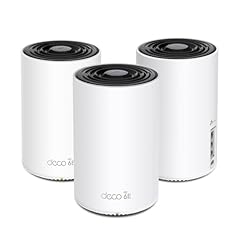
TP-Link Deco XE75 AXE5400 Tri-Band WiFi 6E System
- Wi-Fi standard
- Wi-Fi 6E
- Bands
- Tri-band
- Speed class
- 5001 to 10000
- Coverage
- Over 6,000 sq ft
- Pack size
- 3 pack or more
$199.99 (as of 10/26/2026 20:06 PDT - Details)
The Deco XE75 three-pack is the Wi-Fi 6E mesh kit in this guide with three units in one listing and a listed speed of 5001 to 10000. It brings the 6 GHz band to multiple rooms without requiring Wi-Fi 7 hardware.
Pros
- Three units in one pack
- Tri-band Wi-Fi 6E
- Listed speed of 5001 to 10000
Cons
- Wi-Fi 6E generation, not Wi-Fi 7
- Area not stated in the listing
Good fit if
- Multi-room homes with Wi-Fi 6E clients
- Buyers who want a complete kit rather than adding nodes later
Skip if
- Homes that want Wi-Fi 7 mesh
- Compact spaces that need one router only
Verdict: The Deco XE75 three-pack is the Wi-Fi 6E mesh kit with three units and a 5001 to 10000 speed class in this guide.
8 Best Wi-Fi 6 mesh two-pack

TP-Link Deco X55 AX3000 WiFi 6 Mesh System
- Wi-Fi standard
- Wi-Fi 6
- Speed class
- 2001 to 5000
- Coverage
- 4,001 to 6,000 sq ft
- Pack size
- 2 pack
- Mesh
- Yes
$119.98 (as of 10/26/2026 20:06 PDT - Details)
The Deco X55 two-pack is a dual-band Wi-Fi 6 mesh kit with a listed speed of 2001 to 5000 and two nodes in one listing. It is the two-unit option for homes that do not need a third radio.
Pros
- Two nodes in one pack
- Dual-band Wi-Fi 6 mesh
- Listed speed of 2001 to 5000
Cons
- No third radio
- Area not stated in the listing
Good fit if
- Medium homes that need two nodes
- Buyers with Wi-Fi 6 devices who want mesh without Wi-Fi 7 hardware
Skip if
- Homes that need three nodes
- Buyers who want Wi-Fi 7 mesh
Verdict: The Deco X55 two-pack is the two-node Wi-Fi 6 mesh option in this guide.
9 Best dual-band Wi-Fi 7 mesh system

TP-Link Deco 7 BE23 Dual-Band BE3600 WiFi 7 Mesh Wi-Fi System
- Wi-Fi standard
- Wi-Fi 7
- Bands
- Dual-band
- Speed class
- 2001 to 5000
- Coverage
- Over 6,000 sq ft
- Pack size
- 3 pack or more
- Mesh
- Yes
- Multi-gig port
- Yes
$204.99 (as of 10/26/2026 20:06 PDT - Details)
The Deco 7 BE23 three-pack is a dual-band Wi-Fi 7 mesh kit with a listed speed of 2001 to 5000. It is the three-unit Wi-Fi 7 option for homes that do not need a tri-band layout.
Pros
- Three nodes in one pack
- Dual-band Wi-Fi 7 mesh
- Newer generation than the Wi-Fi 6 mesh picks
Cons
- No third radio
- Listed speed class is 2001 to 5000, while other Wi-Fi 7 mesh picks are 5001 to 10000 or Over 10000
Good fit if
- Homes adopting Wi-Fi 7 with a simple band layout
- Buyers who want a three-pack mesh kit
Skip if
- Homes that want tri-band Wi-Fi 7 mesh
- Homes that already have a Wi-Fi 6 mesh and no Wi-Fi 7 clients
Verdict: The Deco 7 BE23 three-pack is the dual-band Wi-Fi 7 mesh kit with three nodes in this guide.
10 Best travel router

Roam 7 BE3600 Wi-Fi 7 Portable Travel Router Dual-Band
- Wi-Fi standard
- Wi-Fi 7
- Bands
- Dual-band
- Speed class
- 2001 to 5000
- Multi-gig port
- Yes
- Travel
- Yes
$87.99 (as of 10/26/2026 19:05 PDT - Details)
The Roam 7 is the travel router in this guide with Wi-Fi 7 and multigig support marked in the listing. It has a dual-band layout and a listed speed of 2001 to 5000, which suits portable use.
Pros
- Wi-Fi 7 in a travel-sized router
- Multigig support listed
- Dual-band with a listed speed of 2001 to 5000
Cons
- Not a mesh system
- Area for travel use not stated by the seller
Good fit if
- Frequent travelers with Wi-Fi 7 laptops
- People in apartments or RVs who want a small router
Skip if
- Homes that need mesh nodes
- Buyers who want a desktop router with many Ethernet ports
Verdict: The Roam 7 is the Wi-Fi 7 travel router with multigig support in this guide.
11 Best Wi-Fi 6 travel router

Roam 6 AX1500 Portable Wi-Fi 6 Travel Router Dual-Band USB C 3.0
- Wi-Fi standard
- Wi-Fi 6
- Bands
- Dual-band
- Speed class
- Up to 2000
- Travel
- Yes
$44.99 (as of 10/26/2026 19:05 PDT - Details)
The Roam 6 AX1500 is the portable Wi-Fi 6 option in this guide, with a dual-band layout and a listed speed of Up to 2000. It is a travel-friendly router for Wi-Fi 6 devices when the Roam 7 is not needed.
Pros
- Portable travel-router form
- Dual-band Wi-Fi 6
- USB-C connection stated in the product name
Cons
- Listed speed class is Up to 2000
- Multigig support not stated in the specs
Good fit if
- Travelers with Wi-Fi 6 devices
- Buyers who want a compact router for short-term rentals
Skip if
- Homes that need Wi-Fi 7
- Buyers who want the multigig port of the Roam 7
Verdict: The Roam 6 AX1500 is the Wi-Fi 6 travel router in this guide.
12 Best AX1800 Wi-Fi 6 router

TP-Link AX1800 WiFi 6 Router
- Wi-Fi standard
- Wi-Fi 6
- Bands
- Dual-band
- Speed class
- Up to 2000
- Mesh
- Yes
$54.99 (as of 10/26/2026 20:06 PDT - Details)
The Archer AX21 is the AX1800-class Wi-Fi 6 router in this guide, with a listed speed of Up to 2000 and a standalone design. It is a direct Wi-Fi 6 upgrade for homes that do not need the 5001 to 10000 class of the AX80.
Pros
- AX1800-class Wi-Fi 6 with a listed speed of Up to 2000
- Standalone router design
- Newer generation than the Wi-Fi 5 models in the pool
Cons
- Band count not stated by the seller
- Listed speed class is Up to 2000
- Mesh support not stated by the seller
Good fit if
- Homes upgrading from a Wi-Fi 5 router
- Buyers who want a single Wi-Fi 6 router without mesh hardware
Skip if
- Homes that want the 5001 to 10000 class of the AX80
- Buyers who need Wi-Fi 7
Verdict: The Archer AX21 is the AX1800 standalone Wi-Fi 6 router in this guide.
13 Best dual-band Wi-Fi 7 router

TP-Link BE6500 Dual-Band WiFi 7 Router
- Wi-Fi standard
- Wi-Fi 7
- Bands
- Dual-band
- Speed class
- 5001 to 10000
- Coverage
- 2,001 to 4,000 sq ft
- Multi-gig port
- Yes
$139.00 (as of 10/26/2026 20:06 PDT - Details)
The Archer BE400 is the standalone dual-band Wi-Fi 7 router with a listed speed of 5001 to 10000. It keeps a two-radio layout while using the Wi-Fi 7 generation, so it fits homes that do not need a third band.
Pros
- Dual-band Wi-Fi 7
- Listed speed of 5001 to 10000
- Standalone router form
Cons
- No third radio
- Mesh support not stated by the seller
Good fit if
- Homes with Wi-Fi 7 clients that do not need tri-band
- Buyers who want a single-router Wi-Fi 7 upgrade
Skip if
- Homes with many devices contending for the same bands
- Buyers who want an Over 10000 speed class
Verdict: The Archer BE400 is the dual-band Wi-Fi 7 router with a 5001 to 10000 speed class in this guide.
Comparison table
| # | Router | Wi-Fi standard | Bands | Speed class | Coverage | Pack size | Mesh |
|---|---|---|---|---|---|---|---|
| 1 | TP-Link Tri-Band BE9300 WiFi 7 Router | Wi-Fi 7 | Tri-band | 5001 to 10000 | Up to 2,000 sq ft | not stated | not stated |
| 2 | TP-Link Tri-Band BE18000 WiFi 7 Router | Wi-Fi 7 | Tri-band | Over 10000 | not stated | not stated | Yes |
| 3 | TP-Link AX6000 Wi-Fi 6 Dual Band Router | Wi-Fi 6 | Dual-band | 5001 to 10000 | not stated | not stated | not stated |
| 4 | TP-Link Tri-Band BE19000 Wi-Fi 7 Gaming Router | Wi-Fi 7 | Tri-band | Over 10000 | not stated | not stated | not stated |
| 5 | TP-Link Tri-Band AXE5400 Wi-Fi 6E Gaming Router 6-Stream | Wi-Fi 6E | Tri-band | 5001 to 10000 | not stated | not stated | not stated |
| 6 | TP-Link Deco 7 Mesh Bundle | Wi-Fi 7 | Dual-band | 2001 to 5000 | Over 6,000 sq ft | 3 pack or more | Yes |
| 7 | TP-Link Deco XE75 AXE5400 Tri-Band WiFi 6E System | Wi-Fi 6E | Tri-band | 5001 to 10000 | Over 6,000 sq ft | 3 pack or more | not stated |
| 8 | TP-Link Deco X55 AX3000 WiFi 6 Mesh System | Wi-Fi 6 | not stated | 2001 to 5000 | 4,001 to 6,000 sq ft | 2 pack | Yes |
| 9 | TP-Link Deco 7 BE23 Dual-Band BE3600 WiFi 7 Mesh Wi-Fi System | Wi-Fi 7 | Dual-band | 2001 to 5000 | Over 6,000 sq ft | 3 pack or more | Yes |
| 10 | Roam 7 BE3600 Wi-Fi 7 Portable Travel Router Dual-Band | Wi-Fi 7 | Dual-band | 2001 to 5000 | not stated | not stated | not stated |
| 11 | Roam 6 AX1500 Portable Wi-Fi 6 Travel Router Dual-Band USB C 3.0 | Wi-Fi 6 | Dual-band | Up to 2000 | not stated | not stated | not stated |
| 12 | TP-Link AX1800 WiFi 6 Router | Wi-Fi 6 | Dual-band | Up to 2000 | not stated | not stated | Yes |
| 13 | TP-Link BE6500 Dual-Band WiFi 7 Router | Wi-Fi 7 | Dual-band | 5001 to 10000 | 2,001 to 4,000 sq ft | not stated | not stated |
How this list was made
The pool for this guide has 50 TP-Link listings, including routers, mesh systems, travel routers, and one cellular model. The shortlist holds 15 picks that represent the main uses: Wi-Fi 7 and Wi-Fi 6 routers, mesh kits of one to three units, gaming models, and portable travel routers. Each pick comes from the catalogue data attached to its listing: Wi-Fi generation, band count, speed class, mesh support, pack size, and extra features such as gaming or travel designation. Prices shown with each listing are live and read from the store at the time of writing, and they refresh on the page. No member of the site has tested these units, so the claims in this guide are limited to what the listed specs and official descriptions support.
Choosing the right one
Wi-Fi generation: what 6, 6E, and 7 mean
The listings in this guide use Wi-Fi generation labels. Wi-Fi 6, introduced in 2018, added OFDMA, MU-MIMO, 160 MHz capability, and 1024 QAM. Wi-Fi 6E extends Wi-Fi 6 into the 6 GHz band. Wi-Fi 7, introduced in 2024, uses 320 MHz channels in 6 GHz, multi-link operation, and 4K QAM. If your devices support Wi-Fi 7, a BE-series router or Deco 7 system will use that generation. If they do not, Wi-Fi 6 or 6E equipment still connects and remains a workable choice.
Single router or mesh system?
A single router such as the Archer BE550 or BE770 replaces one device and is a direct upgrade. A mesh system such as the Deco line splits signal across multiple nodes. The catalogue data marks mesh support and pack size. For a multiroom home, a two-pack or three-pack mesh kit gives you more nodes to place around. For a single router, choose an Archer model. When a listing does not state pack size, confirm how many units are included before buying.
How to read TP-Link speed classes
The catalogue groups Wi-Fi speed into four classes: Up to 2000, 2001 to 5000, 5001 to 10000, and Over 10000. These classes are based on the router's combined radio speed specification, not a guaranteed real-world throughput. They help you compare models within a generation. A tri-band router can use more radios than a dual-band one, which is why speed class and band count are both worth checking.
Dual-band vs. tri-band
Dual-band routers use 2.4 GHz and 5 GHz. Tri-band routers add a second 5 GHz radio or, in Wi-Fi 6E and Wi-Fi 7 models, a 6 GHz band. The pool lists dual-band and tri-band options. If you have many devices, a tri-band model gives traffic more room to spread. If your devices are older, dual-band can be enough.
Special-purpose models: gaming and travel
Some TP-Link listings are labeled by TP-Link as gaming routers, such as the Archer GE800 and GXE75. Others are marked as travel routers, such as the Roam 7 and Roam 6. Gaming listings tend to have tri-band layouts and the speed classes listed in the product name. Travel listings are portable and may include extras such as a multigig port or USB connection. Match the label to your use case.
Security considerations
Wi-Fi Alliance describes WPA3 as mandatory for Wi-Fi CERTIFIED devices and requires Protected Management Frames. Not every catalogue listing in this guide states the security features of the router, so if WPA3 support matters to you, check the documentation for the exact model. NIST's cybersecurity resources are a useful starting point for understanding home network security basics.
Questions
Do I need Wi-Fi 7 in 2026?
Only if your devices and internet service can use it. Wi-Fi 7 adds 320 MHz channels in 6 GHz, multi-link operation, and 4K QAM, which can improve throughput and reliability for demanding applications. If your laptop, phone, and TV are Wi-Fi 6 or 6E, a Wi-Fi 6 router such as the Archer AX80 or a Wi-Fi 6 mesh system will still work. Wi-Fi 7 equipment is the newer choice, but it is not required for every home.
What is the difference between Archer and Deco?
Archer is the name TP-Link uses for its single-router line, and Deco is the mesh system line. In this guide, Archer models appear as standalone routers, while Deco models are marked as mesh and often come in packs of one, two, or three. A standalone Archer router works from one location; a Deco system spreads multiple nodes around a home.
How many mesh nodes do I need?
That depends on your floor plan and how many rooms have weak Wi-Fi. TP-Link mesh kits in this guide are sold as one-pack, two-pack, three-pack, or multi-unit bundles. A one-pack is effectively a single mesh node; two- and three-packs put more nodes in different rooms. Some listings do not state a pack size or area figure, so check the listing details before you order.
Can I use a TP-Link travel router at home?
Yes, a travel router can work in a small home or apartment, especially if it supports Wi-Fi 7 and a multigig port like the Roam 7. However, travel routers in this guide are not mesh systems, so you will not get the multi-node layout of a Deco kit. If your main concern is whole-home signal, choose a mesh system instead of a travel model.
Does every TP-Link router support WPA3?
Wi-Fi Alliance says WPA3 is mandatory for Wi-Fi CERTIFIED devices, and it recommends Protected Management Frames. The TP-Link listings in this guide do not all state security features, so you should verify the exact model's specs before buying. If WPA3 support is important, look for a current router and confirm with TP-Link's documentation.
What changed
- : First published.