
Best Gaming Routers in 2026: 15 Picks Compared on Specs
The ASUS ROG Rapture GT-BE98 Pro is the top gaming router in this group: it is the only quad-band Wi-Fi 7 model among the 15 picks, and it carries a mesh flag for whole-home setups. We chose these gaming routers from the catalogue by comparing their stated specifications rather than by testing them. The list covers Wi-Fi 6 through Wi-Fi 7, dual-band through quad-band, and includes mesh systems and multigig wired options for different room sizes.
15 picks from 21 routers that match this guide with a price we can quote today, made by 29 makers. Each price below is read live and stamped with the time it was read.
The short list
Who each pick suits
- For esports at a desk: You sit close to the router and want tri-band Wi-Fi 6E with AI QoS without moving to Wi-Fi 7. See pick 5
- For a large house: You need a mesh system that covers more than 6,000 square feet and can handle many devices. See pick 7
- For future-proofing: You want the latest Wi-Fi generation with a tri-band layout and mesh support now. See pick 14
- For a first gaming router: You want a simple Wi-Fi 7 router with Game Accelerator features and a mesh option later. See pick 2
The 15 picks, one by one
1 Best Wi-Fi 6 router with dual 2.5G ports

GL.iNet GL-MT6000 Flint 2 Wi-Fi 6 Gaming Router Dual 2.5G Ports
- Wi-Fi standard
- Wi-Fi 6
- Multi-gig port
- Yes
- Gaming
- Yes
$169.99 (as of 10/26/2026 14:10 PDT - Details)
The Flint 2 is one of three picks with a multigig spec, and its dual 2.5G ports give both a wired gaming PC and a 2.5G internet modem their own fast connection. Compared with the ASUS TUF BE6500, this GL.iNet stays on Wi-Fi 6 while adding wired multigig flexibility.
Pros
- Dual 2.5G ports stated in the product name
- Multigig networking flag in the catalogue
- Wi-Fi 6 support for current devices
Cons
- Speed class not stated by the seller
- No mesh flag in the catalogue
Good fit if
- Anyone with a 2.5G internet plan or a 2.5G NAS
- Gamers who want wired low latency without moving to tri-band
Skip if
- You want Wi-Fi 6E or Wi-Fi 7
- You need whole-home mesh support from one system
Verdict: A Wi-Fi 6 gaming router that earns its place with dual multigig wired ports.
2 Best dual-band Wi-Fi 7 for gaming

ASUS TUF Gaming BE6500 WiFi 7 Router
- Wi-Fi standard
- Wi-Fi 7
- Bands
- Dual-band
- Speed class
- 5001 to 10000
- Mesh
- Yes
- Multi-gig port
- Yes
- Gaming
- Yes
$195.00 (as of 10/26/2026 12:09 PDT - Details)
This is the dual-band Wi-Fi 7 pick with a game accelerator and multi-link operation in its listing, and one of six mesh-flagged routers in this list. It pairs current Wi-Fi 7 with mesh support, which separates it from the TP-Link GE400 and the GL.iNet Flint 3e.
Pros
- Wi-Fi 7 with a dual-band layout
- Mesh flag in the catalogue
- Game Accelerator and Multi-Link Operation named by the seller
- Speed class in the 5,001 to 10,000 range
Cons
- Dual-band only, so no tri-band traffic separation
- Speed class below the over-10,000 picks
Good fit if
- Gamers upgrading from Wi-Fi 5 or Wi-Fi 6 to Wi-Fi 7
- Homes that may add a second mesh unit later
Skip if
- You want a tri-band or quad-band router
- You need more than a dual-band layout
Verdict: A versatile dual-band Wi-Fi 7 gaming router with a mesh option.
3 Best dual-band Wi-Fi 6 for smaller homes

NETGEAR Nighthawk WiFi 6 Router
- Wi-Fi standard
- Wi-Fi 6
- Bands
- Dual-band
- Speed class
- 2001 to 5000
- Coverage
- Up to 2,000 sq ft
- Gaming
- Yes
The RAX36 is one of only two picks with a coverage figure, and its 2,000 sq ft claim targets smaller homes. On the speed scale it falls in the 2,001 to 5,000 class, below the Wi-Fi 7 routers but above the entry-level ASUS.
Pros
- Dual-band Wi-Fi 6
- Coverage stated as up to 2,000 sq ft
- AX3000 and 3 Gbps wireless speed in the listing
- Gaming flag in the catalogue
Cons
- Dual-band only
- No mesh flag in the catalogue
- Speed class below several picks
Good fit if
- Compact apartments or houses around 2,000 sq ft
- Gamers who want a focused Wi-Fi 6 router
Skip if
- You want Wi-Fi 6E or Wi-Fi 7
- You need a mesh system for multiple rooms
Verdict: A sensible dual-band Wi-Fi 6 gaming router for a smaller home.
4 Best tri-band Wi-Fi 7 for maximum throughput

TP-Link Tri-Band BE19000 Wi-Fi 7 Gaming Router
- Wi-Fi standard
- Wi-Fi 7
- Bands
- Tri-band
- Speed class
- Over 10000
- Multi-gig port
- Yes
- Gaming
- Yes
$449.99 (as of 10/26/2026 20:06 PDT - Details)
The GE800 is one of two picks with a speed class above 10,000 and the non-mesh option among them. It gives a direct comparison to ASUS's tri-band Wi-Fi 7 routers if you want TP-Link's gaming line at the high end.
Pros
- Tri-band Wi-Fi 7
- Speed class over 10,000
- Gaming router branding from TP-Link
Cons
- No mesh flag in the catalogue
- Band layout is tri-band rather than quad-band
- 10G port not stated by the seller
Good fit if
- Gamers who want TP-Link's gaming line
- Those with high-speed broadband who prefer a single router
Skip if
- You need mesh support
- You want a 10G wired port
Verdict: A high-throughput tri-band Wi-Fi 7 gaming router without mesh.
5 Best Wi-Fi 6E tri-band with AI QoS

MSI Radix AXE6600 WiFi 6E Tri-Band Gaming Router
- Wi-Fi standard
- Wi-Fi 6E
- Bands
- Tri-band
- Speed class
- 5001 to 10000
- Gaming
- Yes
$106.72 (as of 10/26/2026 17:09 PDT - Details)
The Radix AXE6600 is the tri-band Wi-Fi 6E pick with an AI QoS label and a 1.8GHz quad-core processor in its listing. It shares the 5,001 to 10,000 speed class with several Wi-Fi 7 routers but uses Wi-Fi 6E for an early route into the 6 GHz spectrum.
Pros
- Tri-band Wi-Fi 6E
- AI QoS named in the listing
- 1.8 GHz quad-core processor stated
- Speed class 5,001 to 10,000
Cons
- No mesh flag in the catalogue
- Coverage figure not stated by the seller
Good fit if
- Gamers upgrading from Wi-Fi 6 to get 6 GHz spectrum
- Users who want QoS without jumping to Wi-Fi 7
Skip if
- You want mesh support
- You require a Wi-Fi 7 router
Verdict: A tri-band Wi-Fi 6E gaming router with processor-level QoS.
6 Best scalable Wi-Fi 6 mesh system

AmpliFi Ubiquiti Alien Tri-Band WiFi 6 Scalable Mesh System Router WiFi
- Wi-Fi standard
- Wi-Fi 6
- Bands
- Tri-band
- Mesh
- Yes
- Gaming
- Yes
$599.95 (as of 10/26/2026 22:49 PDT - Details)
The Alien is a tri-band Wi-Fi 6 mesh system from Ubiquiti's AmpliFi line, with gaming in its listing and a scalable mesh note. Unlike the Linksys three-pack, this is a single-unit entry that can expand into a mesh system.
Pros
- Tri-band Wi-Fi 6 mesh product
- Ubiquiti AmpliFi brand
- Scalable mesh system in the listing
- Gaming flag in the catalogue
Cons
- Speed class not stated by the seller
- Coverage figure not stated by the seller
- Number of included units not stated by the seller
Good fit if
- Users who want a single router that can grow into mesh later
- AmpliFi ecosystem owners
Skip if
- You need coverage for a very large home out of the box
- You want Wi-Fi 6E or Wi-Fi 7
Verdict: A scalable tri-band Wi-Fi 6 mesh router for gradual whole-home expansion.
7 Best mesh for very large homes

Linksys MX8503 Atlas WiFi 6E Router Home WiFi Mesh System
- Wi-Fi standard
- Wi-Fi 6E
- Bands
- Tri-band
- Speed class
- 5001 to 10000
- Coverage
- Over 6,000 sq ft
- Pack size
- 3 pack or more
- Mesh
- Yes
- Gaming
- Yes
The Atlas MX8503 is the only three-pack in this list and carries the strongest coverage promise at over 6,000 sq ft. It also states support for 195-plus devices, which makes it the obvious mesh pick for dense households.
Pros
- Three-pack mesh system
- Coverage spec over 6,000 sq ft
- 195+ devices stated in the listing
- Tri-band Wi-Fi 6E
Cons
- Speed class 5,001 to 10,000, not the highest in this list
- 10G port not stated by the seller
Good fit if
- Large homes where one router cannot reach all rooms
- Households with more than one wired and wireless gaming device
Skip if
- You want a single compact router
- You need a 10G port tier
Verdict: A three-node Wi-Fi 6E mesh system for very large homes.
8 Best Wi-Fi 7 with built-in VPN

GL.iNet GL-BE6500 Flint 3e Wi-Fi 7 Router
- Wi-Fi standard
- Wi-Fi 7
- Speed class
- 5001 to 10000
- Gaming
- Yes
$179.99 (as of 10/26/2026 14:10 PDT - Details)
The Flint 3e is a Wi-Fi 7 router with a VPN feature in its product name, aimed at home and gaming use. It matches the speed class of the ASUS TUF BE6500 but omits a band count and mesh flag, so treat it as a standalone gaming router.
Pros
- Wi-Fi 7 support
- Built-in VPN named by the seller
- Speed class 5,001 to 10,000
- Gaming use case in the listing
Cons
- Band layout not stated by the seller
- No mesh flag in the catalogue
- Coverage figure not stated by the seller
Good fit if
- Gamers who want VPN capability at the router level
- Users comfortable with a standalone Wi-Fi 7 router
Skip if
- You want a tri-band or quad-band Wi-Fi 7 router
- You need mesh support or a listed coverage figure
Verdict: A Wi-Fi 7 gaming router that adds VPN to its feature set.
9 Best for lower-speed broadband connections

ASUS RT-AX1800S Dual Band WiFi 6 Extendable Router
- Wi-Fi standard
- Wi-Fi 6
- Bands
- Dual-band
- Speed class
- Up to 2000
- Gaming
- Yes
$61.99 (as of 10/26/2026 12:09 PDT - Details)
The RT-AX1800S is the only pick in the Up to 2000 speed class, making it the simplest Wi-Fi 6 option for lower-speed broadband. It stays useful for gaming with a gaming flag plus ASUS features like built-in VPN and subscription-free security listed by the seller.
Pros
- Dual-band Wi-Fi 6
- Lowest speed class in this list, which suits modest plans
- Built-in VPN and subscription-free security from the seller listing
- Gaming flag in the catalogue
Cons
- Speed class Up to 2,000, the lowest among these picks
- Dual-band only
- No mesh flag in the catalogue
Good fit if
- Gamers on broadband plans below 2 Gbps
- People who want ASUS security software without a subscription
Skip if
- You have a multigig internet plan
- You need tri-band Wi-Fi 6E or Wi-Fi 7
Verdict: An easy Wi-Fi 6 router for gamers with modest connection speeds.
10 Best dual-band Wi-Fi 7 router in TP-Link's gaming line
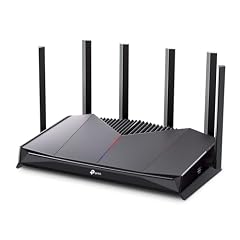
TP-Link Dual-Band BE6500 WiFi 7 Gaming Router 6.5 Gbps
- Wi-Fi standard
- Wi-Fi 7
- Bands
- Dual-band
- Speed class
- 5001 to 10000
- Multi-gig port
- Yes
- Gaming
- Yes
$194.99 (as of 10/26/2026 20:06 PDT - Details)
The Archer GE400 is a dual-band Wi-Fi 7 gaming router in TP-Link's Archer line, rated in the 5,001 to 10,000 speed class. Compared with the ASUS TUF BE6500, it drops the mesh flag but keeps the same Wi-Fi generation and speed class.
Pros
- Wi-Fi 7 support
- Dual-band layout
- Speed class 5,001 to 10,000
- Gaming router branding from TP-Link
Cons
- Dual-band only
- No mesh flag in the catalogue
- 10G port not stated by the seller
Good fit if
- TP-Link fans who want Wi-Fi 7 now
- Gamers who do not need mesh support
Skip if
- You need a mesh-capable system
- You want a tri-band or quad-band Wi-Fi 7 router
Verdict: A straightforward dual-band Wi-Fi 7 gaming router.
11 Best Wi-Fi 7 with a 10G port

ASUS GT-BE19000AI Tri-Band WiFi 7 AI Gaming Router
- Wi-Fi standard
- Wi-Fi 7
- Bands
- Tri-band
- Coverage
- 2,001 to 4,000 sq ft
- Multi-gig port
- Yes
- Gaming
- Yes
$639.99 (as of 10/26/2026 12:08 PDT - Details)
This tri-band Wi-Fi 7 router is the only pick with a 10G port named in its listing and a multigig flag in the catalogue. That makes it the wired-throughput choice next to the quad-band ROG Rapture, which does not state a 10G port.
Pros
- Tri-band Wi-Fi 7
- 10G port in the product name
- Multigig flag in the catalogue
- Game Boost feature named by the seller
Cons
- Speed class not stated by the seller
- No mesh flag in the catalogue
- Band layout below the quad-band ROG Rapture
Good fit if
- Gamers with 10G wired networking or very fast internet
- Users who want a single high-end ASUS router with AI features
Skip if
- You need mesh support
- You want quad-band Wi-Fi 7
Verdict: A tri-band Wi-Fi 7 router built around a 10G wired port.
12 Best six-stream Wi-Fi 6E router

TP-Link Tri-Band AXE5400 Wi-Fi 6E Gaming Router 6-Stream
- Wi-Fi standard
- Wi-Fi 6E
- Bands
- Tri-band
- Speed class
- 5001 to 10000
- Multi-gig port
- Yes
- Gaming
- Yes
$121.60 (as of 10/26/2026 20:06 PDT - Details)
The GXE75 is a tri-band Wi-Fi 6E router with a six-stream layout in its name and a speed class of 5,001 to 10,000. It is the TP-Link alternative to the MSI Radix if you prefer six-stream tri-band Wi-Fi 6E.
Pros
- Tri-band Wi-Fi 6E
- Six-stream design in the product name
- Speed class 5,001 to 10,000
- Gaming router branding
Cons
- No mesh flag in the catalogue
- Coverage figure not stated by the seller
- Wi-Fi 6E rather than Wi-Fi 7
Good fit if
- Gamers who want 6 GHz Wi-Fi without moving to Wi-Fi 7
- Users who prefer TP-Link's Archer gaming line
Skip if
- You need mesh support
- You prefer a Wi-Fi 7 router
Verdict: A six-stream tri-band Wi-Fi 6E gaming router.
13 Best overall

ASUS ROG Rapture GT-BE98 Pro WiFi 7 Gaming Router
- Wi-Fi standard
- Wi-Fi 7
- Bands
- Quad-band
- Coverage
- 2,001 to 4,000 sq ft
- Mesh
- Yes
- Multi-gig port
- Yes
- Gaming
- Yes
$684.99 (as of 10/26/2026 12:08 PDT - Details)
The GT-BE98 Pro is the only quad-band router in this list, combining Wi-Fi 7 and mesh support in the ROG Rapture gaming line. With a band count no other pick matches, it is the most capable framework for separating gaming traffic.
Pros
- Quad-band Wi-Fi 7, the only quad-band pick in this list
- Mesh flag in the catalogue
- ROG Rapture gaming line from ASUS
- Supports a whole-home mesh approach without stepping down to Wi-Fi 6
Cons
- Speed class not stated by the seller
- Coverage figure not stated by the seller
- 10G port not stated by the seller
Good fit if
- Gamers who want the highest band count available in this list
- Users who plan a mesh setup with a flagship Wi-Fi 7 router
Skip if
- You want a simpler dual-band router
- You do not need quad-band separation
Verdict: The top-spec gaming router in this list by band count.
14 Best tri-band Wi-Fi 7 mesh router

ASUS ROG Strix GS-BE12000 WiFi 7 Gaming Router
- Wi-Fi standard
- Wi-Fi 7
- Bands
- Tri-band
- Speed class
- Over 10000
- Coverage
- 2,001 to 4,000 sq ft
- Mesh
- Yes
- Multi-gig port
- Yes
- Gaming
- Yes
$314.99 (as of 10/26/2026 12:08 PDT - Details)
The GS-BE12000 is one of two picks with a speed class over 10,000 and the only one of those two that also carries a mesh flag. It gives tri-band Wi-Fi 7 and mesh in the same box, which places it between the non-mesh GE800 and the quad-band GT-BE98 Pro.
Pros
- Tri-band Wi-Fi 7
- Mesh flag in the catalogue
- Speed class over 10,000
- 12 Gbps in the product name
Cons
- Coverage figure not stated by the seller
- Band count lower than the quad-band GT-BE98 Pro
Good fit if
- Gamers with high-speed broadband who also want mesh
- ASUS ROG Strix line fans
Skip if
- You want quad-band Wi-Fi 7
- You need a stated coverage figure for placement planning
Verdict: A tri-band Wi-Fi 7 mesh router with the top speed class in this list.
15 Best Wi-Fi 6 mesh 2-pack

ASUS ROG Rapture GT6
- Wi-Fi standard
- Wi-Fi 6
- Bands
- Tri-band
- Coverage
- 4,001 to 6,000 sq ft
- Pack size
- 2 pack
- Mesh
- Yes
- Multi-gig port
- Yes
- Gaming
- Yes
$499.99 (as of 10/26/2026 12:08 PDT - Details)
The GT6 two-pack is the only mesh bundle in this list with two nodes and a 2.5G port in its listing. Its tri-band Wi-Fi 6 covers up to 5,800 sq ft, according to the seller, and its coverage class sits between the single Netgear and the larger Linksys system.
Pros
- Two-node mesh system
- Tri-band Wi-Fi 6
- Coverage stated as 4,001 to 6,000 sq ft
- Multigig 2.5 Gbps port named in the listing
Cons
- Wi-Fi 6 rather than Wi-Fi 6E or Wi-Fi 7
- Speed class not stated by the seller
- Only two nodes included
Good fit if
- Homes in the 4,000 to 6,000 sq ft range
- Gamers who want mesh plus a wired 2.5G port
Skip if
- You need Wi-Fi 6E or Wi-Fi 7
- You want a single-router setup
Verdict: A two-node Wi-Fi 6 mesh system with a multigig wired port.
Comparison table
| # | Router | Wi-Fi standard | Bands | Speed class | Coverage | Pack size | Mesh |
|---|---|---|---|---|---|---|---|
| 1 | GL.iNet GL-MT6000 Flint 2 Wi-Fi 6 Gaming Router Dual 2.5G Ports | Wi-Fi 6 | not stated | not stated | not stated | not stated | not stated |
| 2 | ASUS TUF Gaming BE6500 WiFi 7 Router | Wi-Fi 7 | Dual-band | 5001 to 10000 | not stated | not stated | Yes |
| 3 | NETGEAR Nighthawk WiFi 6 Router | Wi-Fi 6 | Dual-band | 2001 to 5000 | Up to 2,000 sq ft | not stated | not stated |
| 4 | TP-Link Tri-Band BE19000 Wi-Fi 7 Gaming Router | Wi-Fi 7 | Tri-band | Over 10000 | not stated | not stated | not stated |
| 5 | MSI Radix AXE6600 WiFi 6E Tri-Band Gaming Router | Wi-Fi 6E | Tri-band | 5001 to 10000 | not stated | not stated | not stated |
| 6 | AmpliFi Ubiquiti Alien Tri-Band WiFi 6 Scalable Mesh System Router WiFi | Wi-Fi 6 | Tri-band | not stated | not stated | not stated | Yes |
| 7 | Linksys MX8503 Atlas WiFi 6E Router Home WiFi Mesh System | Wi-Fi 6E | Tri-band | 5001 to 10000 | Over 6,000 sq ft | 3 pack or more | Yes |
| 8 | GL.iNet GL-BE6500 Flint 3e Wi-Fi 7 Router | Wi-Fi 7 | not stated | 5001 to 10000 | not stated | not stated | not stated |
| 9 | ASUS RT-AX1800S Dual Band WiFi 6 Extendable Router | Wi-Fi 6 | Dual-band | Up to 2000 | not stated | not stated | not stated |
| 10 | TP-Link Dual-Band BE6500 WiFi 7 Gaming Router 6.5 Gbps | Wi-Fi 7 | Dual-band | 5001 to 10000 | not stated | not stated | not stated |
| 11 | ASUS GT-BE19000AI Tri-Band WiFi 7 AI Gaming Router | Wi-Fi 7 | Tri-band | not stated | 2,001 to 4,000 sq ft | not stated | not stated |
| 12 | TP-Link Tri-Band AXE5400 Wi-Fi 6E Gaming Router 6-Stream | Wi-Fi 6E | Tri-band | 5001 to 10000 | not stated | not stated | not stated |
| 13 | ASUS ROG Rapture GT-BE98 Pro WiFi 7 Gaming Router | Wi-Fi 7 | Quad-band | not stated | 2,001 to 4,000 sq ft | not stated | Yes |
| 14 | ASUS ROG Strix GS-BE12000 WiFi 7 Gaming Router | Wi-Fi 7 | Tri-band | Over 10000 | 2,001 to 4,000 sq ft | not stated | Yes |
| 15 | ASUS ROG Rapture GT6 | Wi-Fi 6 | Tri-band | not stated | 4,001 to 6,000 sq ft | 2 pack | Yes |
How this list was made
The catalogue matched 15 gaming routers by their gaming flag. Because the group is small, every matching unit was kept for comparison. We then read each pool entry for Wi-Fi generation, band count, speed class, mesh support, multigig ports, and coverage figures. Gaming traffic benefits from traffic-management features, so we also noted the game accelerators, AI QoS, and Multi-Link Operation names used by the sellers. Prices on this page are live from the store listing and are read whenever the page loads. No unit was tested for this guide; choices are based on the seller's published descriptions and on Wi-Fi standards published by the Wi-Fi Alliance and IEEE.
Choosing the right one
Wi-Fi generation: what the standard numbers mean
Gaming routers in this list use Wi-Fi 6, Wi-Fi 6E, or Wi-Fi 7. Wi-Fi 6 added OFDMA, multi-user MIMO, and 1024 QAM, which help congested home networks handle more devices at the same time, according to the Wi-Fi Alliance. Wi-Fi 7 builds on those features with 320 MHz channels in the 6 GHz band, multi-link operation, and 4K QAM, also per the Wi-Fi Alliance. Of the 15 picks here, 7 are Wi-Fi 7, 5 are Wi-Fi 6, and 3 are Wi-Fi 6E. The right generation depends on your internet speed and how many of your devices support it.
Band count: dual, tri, and quad
A dual-band router offers 2.4 GHz and 5 GHz. A tri-band router adds an extra band that can be used to separate gaming traffic from the rest of the home. A quad-band router adds one more, and the ASUS ROG Rapture GT-BE98 Pro is the only quad-band pick here. In this group, 4 are dual-band, 8 are tri-band, and 1 is quad-band; 2 picks do not state a band layout in the seller's description. If many devices share your network, a higher band count often makes it easier to keep game packets clear of video streams and downloads.
Gaming features and traffic prioritization
The key gaming feature on these routers is traffic management. ASUS lists Game Accelerator, Game Boost, or Multi-Link Operation on different models; MSI lists AI QoS; TP-Link brands its units as gaming routers. These features are described by the makers, and this guide did not test their effect. The most reliable way to improve your own connection is still to plug the gaming PC or console into a router LAN port with an Ethernet cable, then let the router's prioritization features manage the rest of the network.
Multigig wired ports
Most home routers use gigabit Ethernet ports, but multigig routers support faster wired speeds. Three of the 15 picks carry a multigig flag in the catalogue: the GL.iNet Flint 2 with dual 2.5G ports, the ASUS GT-BE19000AI with a 10G port named in its product listing, and the ASUS ROG Rapture GT6 two-pack with a 2.5 Gbps port. Check for a multigig port if your internet plan is faster than 1 Gbps or if you move large files between a gaming PC and a NAS.
Mesh systems and coverage
A single router covers the space around it; a mesh system uses multiple nodes to widen coverage under one network name. Six of the 15 picks are flagged as mesh. Across the 15 picks, only three state a coverage figure: the NETGEAR RAX36 says up to 2,000 sq ft, the ASUS ROG Rapture GT6 two-pack says 4,001 to 6,000 sq ft, and the Linksys Atlas three-pack says over 6,000 sq ft. Match the stated coverage to the area you actually use rather than to the maximum number on the box.
Security for a gaming network
A gaming router protects every device on the network, so current Wi-Fi security matters. WPA3 is mandatory for Wi-Fi CERTIFIED devices and requires Protected Management Frames, according to the Wi-Fi Alliance. NIST publishes cybersecurity guidance that covers the kinds of risks home networks face. The pool entries do not all state which security generation they support, so if WPA3 is important to you, confirm it on the product listing before choosing a router.
Questions
Do I need a tri-band router for gaming?
Not necessarily. A dual-band router can work if your gaming device has a strong Wi-Fi signal or a wired Ethernet connection. Tri-band adds an extra band that can carry other devices, which helps when many people share the network. Quad-band goes further, but only one pick in this list, the ASUS ROG Rapture GT-BE98 Pro, has that layout. Match the band count to the number of connected devices and how busy the network is.
What is Wi-Fi 7 and is it worth it for gaming?
Wi-Fi 7 is the latest Wi-Fi generation certified by the Wi-Fi Alliance. It supports 320 MHz channels in the 6 GHz band, multi-link operation, and 4K QAM. Seven of the 15 routers in this list are Wi-Fi 7. Whether it improves your game depends on your internet plan, your devices, and whether they support Wi-Fi 7. If most of your devices use Wi-Fi 6, a Wi-Fi 6 or 6E router can still perform well.
What does a gaming router actually do differently?
Gaming routers generally include traffic-prioritization features, described by makers with names such as Game Accelerator, AI QoS, or Game Boost. The goal is to keep gaming traffic ahead of other traffic on the same network. A router cannot create bandwidth that your internet provider does not deliver; it can only manage the connection it receives. Wired Ethernet is still the most reliable way to connect a gaming PC or console.
Mesh or single router for gaming?
Choose a single high-band router if your gaming setup is mostly in one room. Choose a mesh system if you need strong Wi-Fi in several rooms or across multiple floors. Six of the picks here are mesh-flagged, from the two-node ASUS ROG Rapture GT6 to the three-node Linksys Atlas MX8503. Mesh systems spread coverage, but every node needs power and good placement to form a reliable network.
What is a multigig port?
A multigig port supports wired speeds faster than traditional gigabit Ethernet. In this list, the GL.iNet Flint 2 states dual 2.5G ports, the ASUS GT-BE19000AI names a 10G port, and the ASUS ROG Rapture GT6 names a 2.5 Gbps port. You benefit if your internet plan is faster than 1 Gbps or you transfer large files to a local server.
Does a gaming router improve my ping?
A router can reduce congestion on your local network, but it cannot fix latency caused by your internet service or the game server. Features such as QoS and game accelerators are designed to prioritize game traffic over downloads and streaming. The pool does not include latency measurements, so treat any latency claim in a listing as a marketing description. Connecting by Ethernet is the most direct adjustment you can make.
What changed
- : First published.